Each project document has a Discussion thread for questions, feedback, and decisions about that page. Document creation and saved edits also notify the project's linked Teams channel, helping the team notice important knowledge updates.
Comment on a document
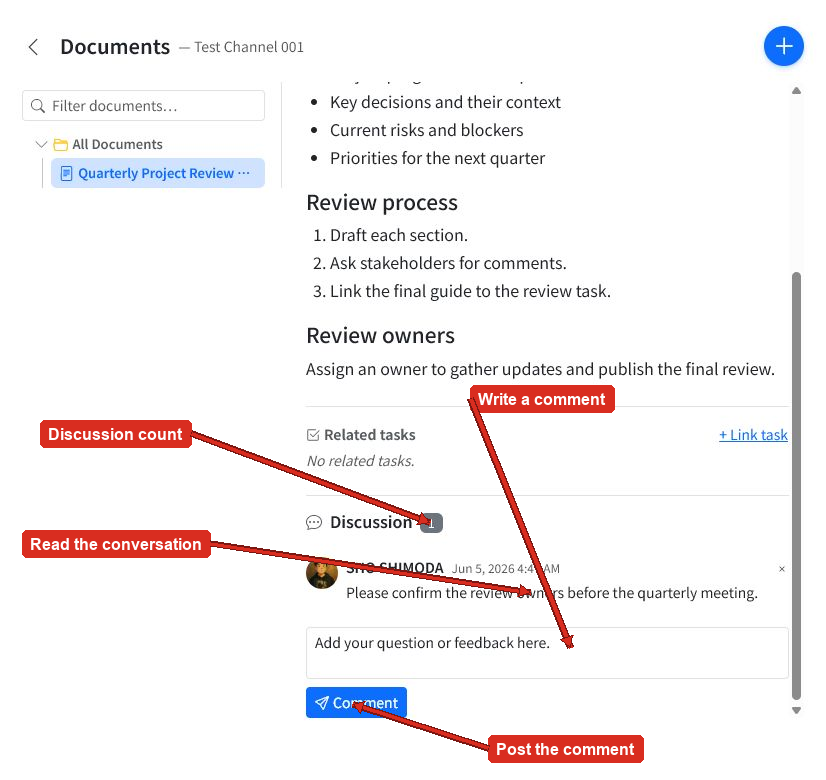
Open the document and scroll to Discussion.
- Review the existing conversation and discussion count.
- Enter your question or feedback in Leave a comment.
- Select Comment to post it.
The comment displays its author and posted time. The discussion count updates as comments are added. Use the remove button beside your own comment when it is no longer needed.
Comments versus document edits
Use comments to ask questions, request clarification, or discuss a proposed change. Comments do not change the document content or create a new document version.
When the team reaches a decision, edit the document so the durable outcome becomes part of the page. Add a clear edit note so teammates can understand the change in History.
Teams notifications
When a project document is created or edited, ActionBridge posts a notification to the project's linked Teams channel. This helps project members discover new pages and notice important updates.
The current document Discussion interface is the reliable place to read and post page comments. Keep the conversation on the document when it needs to remain attached to that knowledge.
Good collaboration habits
- Use comments for focused questions and feedback about the document.
- Include enough context for another teammate to answer without a separate conversation.
- Update the document after resolving a discussion.
- Use a meaningful edit note to summarize the resolved outcome.
- Remove comments only when they are no longer useful to the conversation.