The daily digest in AB Projects is a summary the app sends to you — not a status report you write and submit. Once you pick your weekdays and time, a list of your most urgent open tasks arrives by email or as a Teams message, and AI helps take the routine effort out of the rest of the day.
What the digest contains
Your top open tasks — up to ten, gathered across every project you belong to, ordered by due date, with overdue work flagged. Each task links straight to the task inside Microsoft Teams (or to the web app when the project isn't linked to a channel). The email version also opens with a short AI-written “Today's focus” note that points out what deserves attention first.
Turn it on, step by step
- Open your Settings. In the AB Projects personal app, go to the Settings tab (see Navigating the Interface if you're not sure where that is).
- Find the Task Reminders section. Switch on the weekdays you want a digest, and set the delivery time for each day.
- Choose how it's delivered. Pick email, a Teams message, or both. If you choose neither, AB defaults to email so the digest still reaches you.
Per-task deadline reminders
Separate from the digest, any task can carry its own one-shot reminder. On the task's detail panel, select the bell icon (“Remind me before deadline”) and pick a lead time: 15 minutes, 1 hour, 4 hours, 1 day, 3 days, or 1 week before the due date — or Off.
- The reminder goes to the task's assignee, by email and/or Teams message (same delivery preference as the digest).
- It fires once. If the due date changes, the reminder re-arms against the new deadline automatically.
- It never fires after the deadline has already passed — no pings about things that are already late.
Setting due dates themselves is covered in Setting Deadlines and Priorities.
AI assists during the day
Between digests, AI helps in small, always-visible ways — and it never changes your tasks without your confirmation:
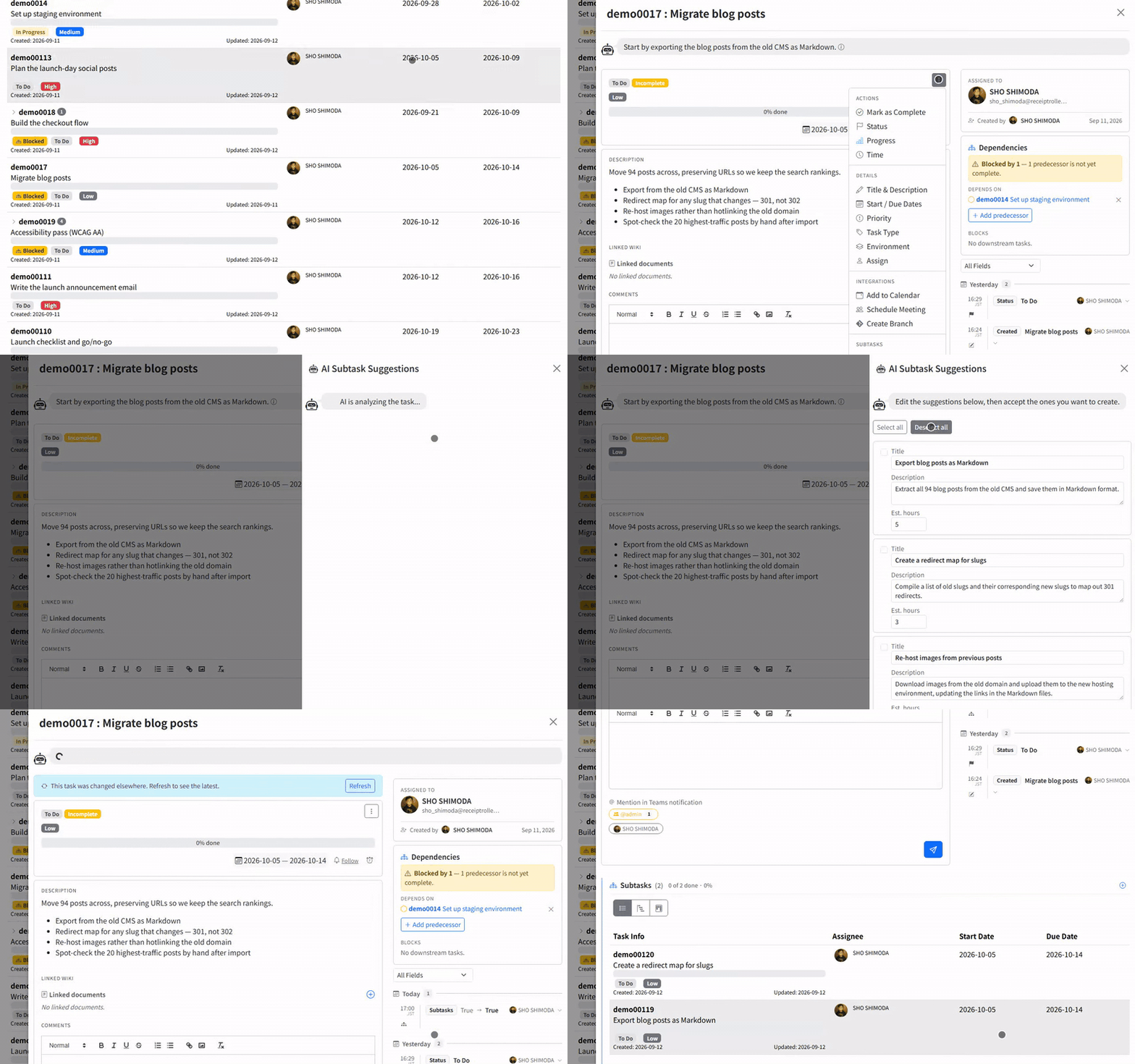
- Task summary. Opening a task shows a short AI-generated read of where the task stands, in a speech bubble at the top — orientation, not a change to the task.
- AI: Suggest Subtasks. From the task's action menu choose AI: Suggest Subtasks. The AI Subtask Suggestions panel proposes a breakdown; edit the rows, use Select all / Deselect all, then press Create Selected Subtasks. Nothing is created until that button.
- AI assistants over MCP (an open standard that lets tools like Claude or ChatGPT connect to your apps) can read and update tasks on your behalf — see Connecting AI Assistants via MCP.
Quick reference
| What | When it happens | Who gets it |
|---|---|---|
| Daily digest | On your chosen weekdays and time; at most once a day | You — email and/or Teams message |
| Deadline reminder | Once, at the lead time you set before a task's due date | The task's assignee |
| AI summary / suggested subtasks | When you open the task or ask for suggestions | Shown in the app; subtasks exist only after you confirm |
Set the digest once, add a bell to the tasks that really can't slip, and let the AI handle the first draft of the busywork — you stay in control of everything it touches.